Translation Adapter
Adds an AI translation engine to TranslatePress that checks every translation before it is saved.
The Translation Adapter translates your website using the AI provider of your choice and writes the result into the TranslatePress dictionary. Existing and manually maintained translations remain unchanged.
Pricing and demo coming soon.
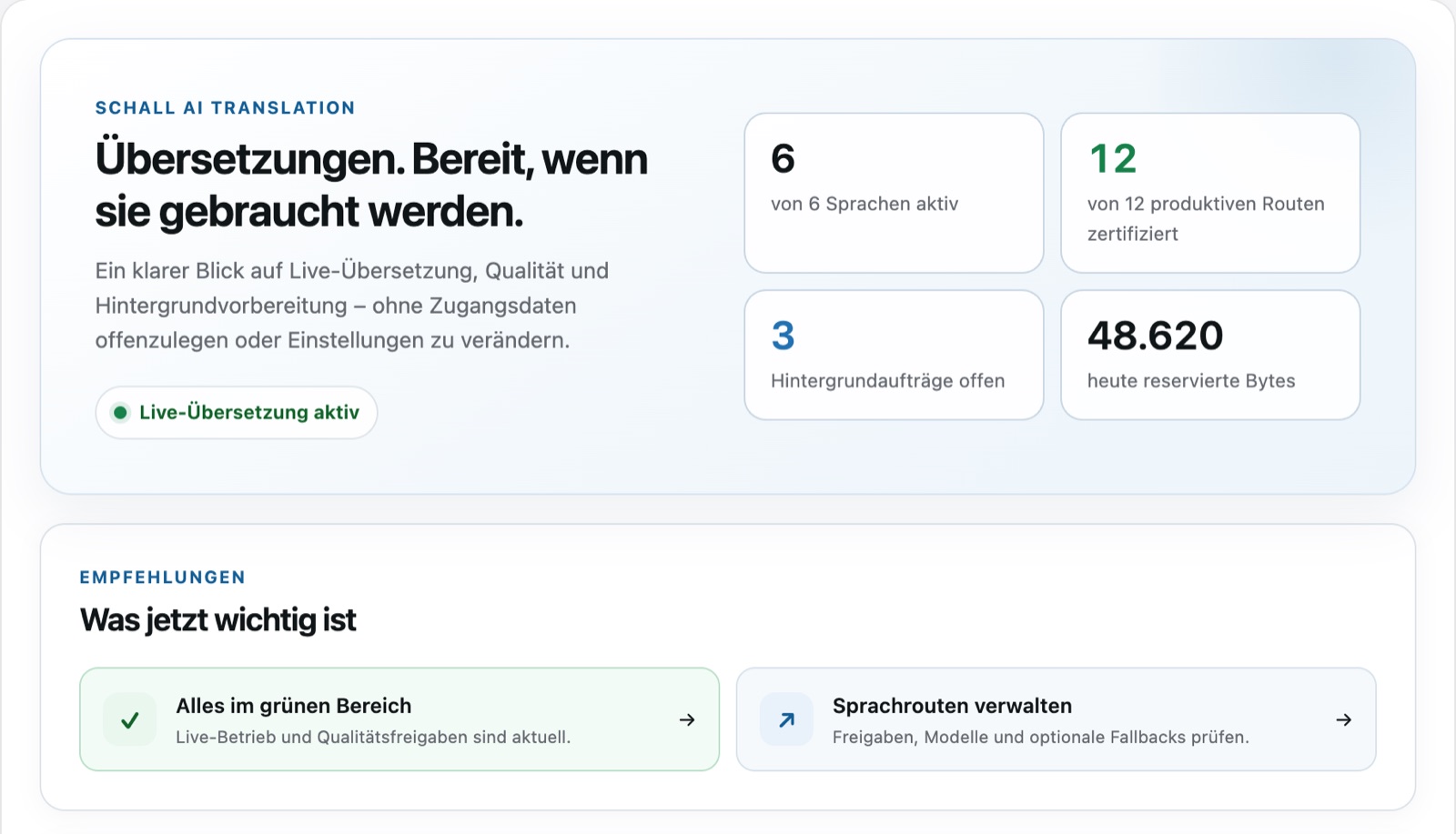
01 — Overview
Translate without giving up control.
Existing translations remain intact
The plugin only writes to entries that TranslatePress marks as untranslated. It never changes manually maintained translations, even after switching providers or models.
Verified before saving
Every response is checked for markup, links, placeholders, numbers, and target language. Anything that fails is not saved; until then, the page displays the source text instead of a faulty translation.
Provider of your choice
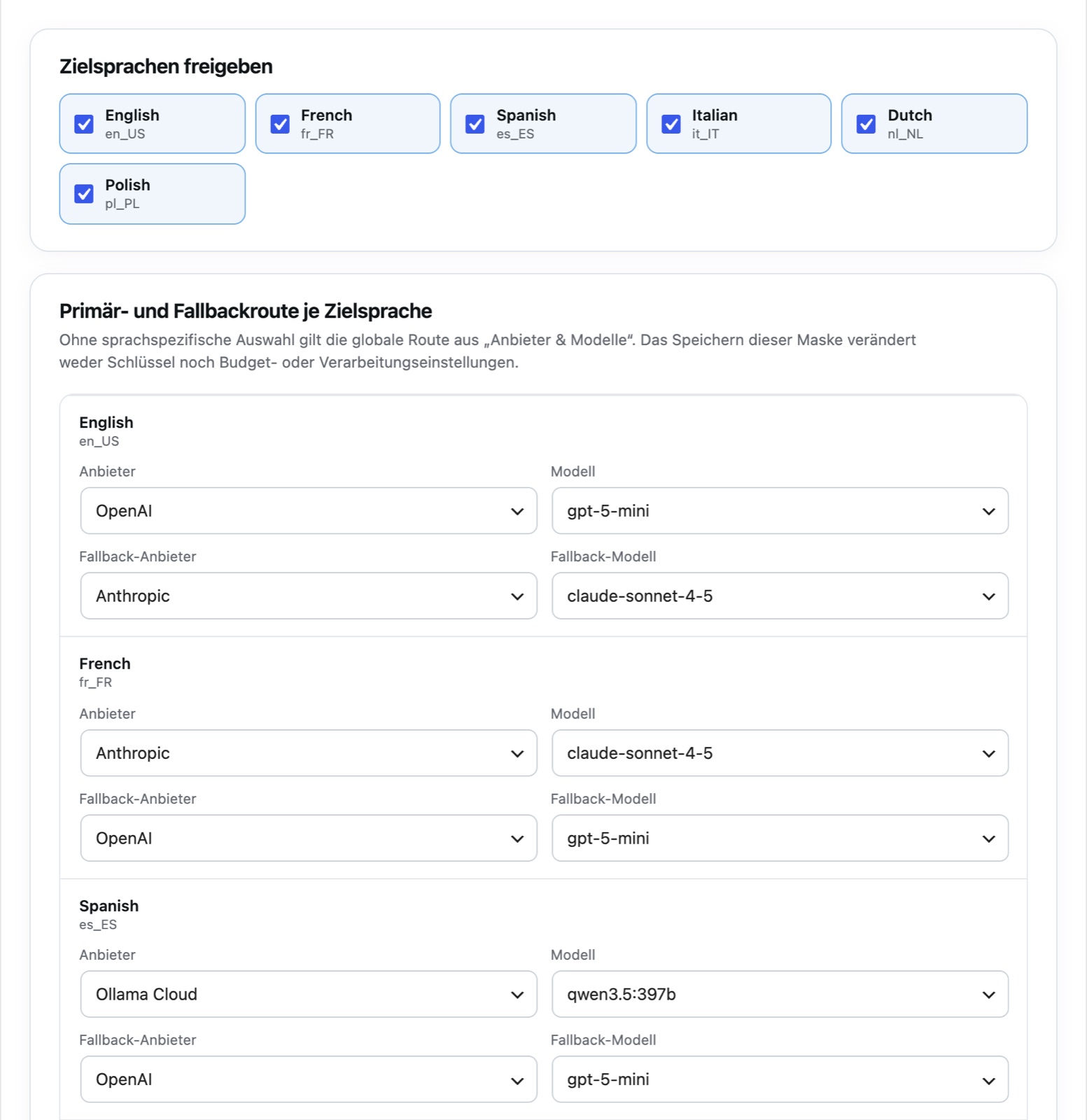
Ollama Cloud, OpenAI, Anthropic, DeepSeek, or your own Ollama server. A custom route with fallback can be defined for each language.
Quality proven per language
In the background, the plugin checks which models translate a language reliably. An independent evaluator model assesses the samples; only models that pass receive a certificate.
Consistent terminology
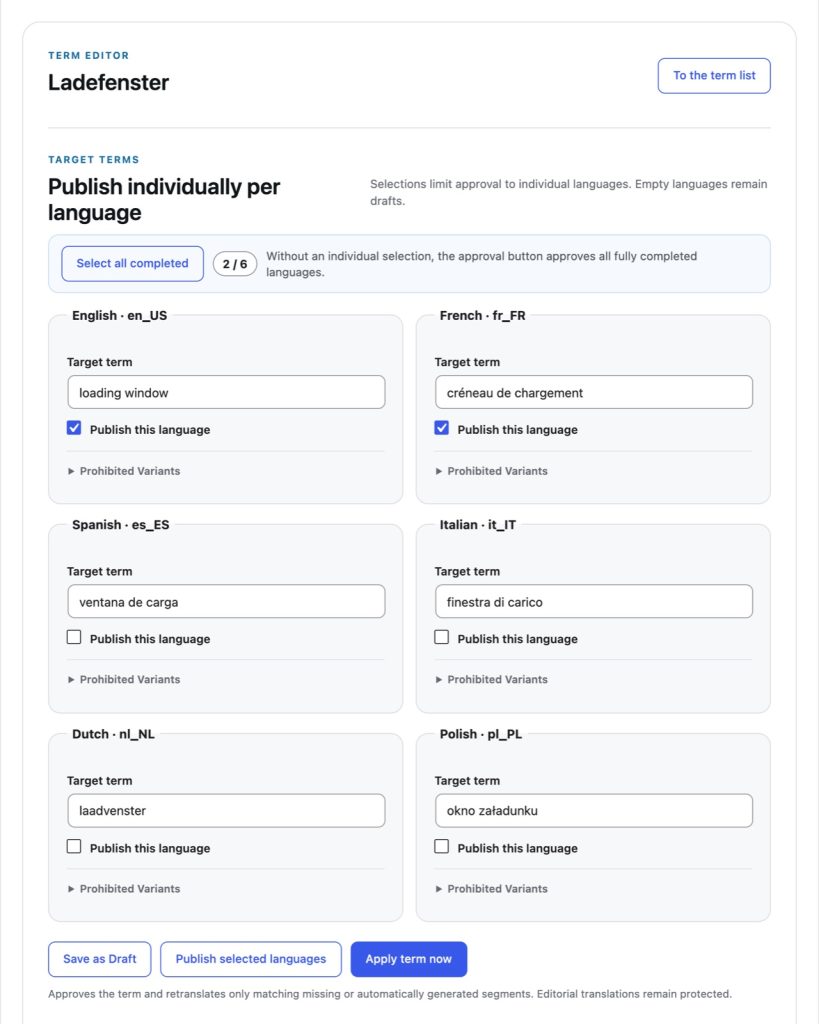
Approved glossary terms take precedence over the model. Drafts remain ineffective until you approve them for each language.
Costs with a cap
A daily limit restricts requests to the provider. If you select flat rate for a lump-sum tariff, only those will be counted.
02 — How it works
How it works.
01
Connect provider
Under “Providers & Models”, you add a provider; the key is verified and stored encrypted.
02
Define languages and routes
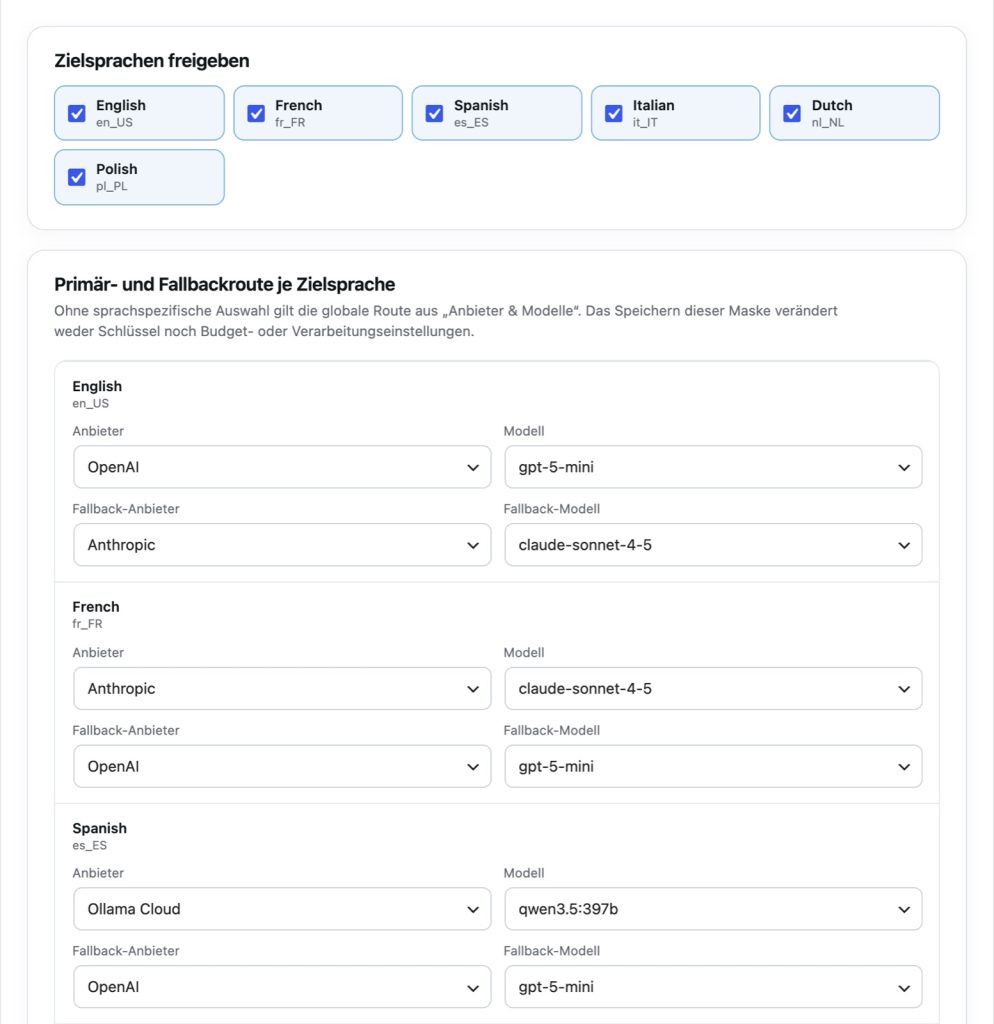
You enable the target languages from TranslatePress and, if needed, set a primary and fallback route per language.
03
Select budget
You choose a daily limit or a flat rate and enable automatic translation.
04
Select engine in TranslatePress
Under “Automatic Translation” you select the Translation Adapter; from then on, it translates new texts.
05
Run and check
New content is translated in the background; the queue shows what requires a decision.
03 — Features
How the adapter works.
Provider
One model for all languages or one route per language.
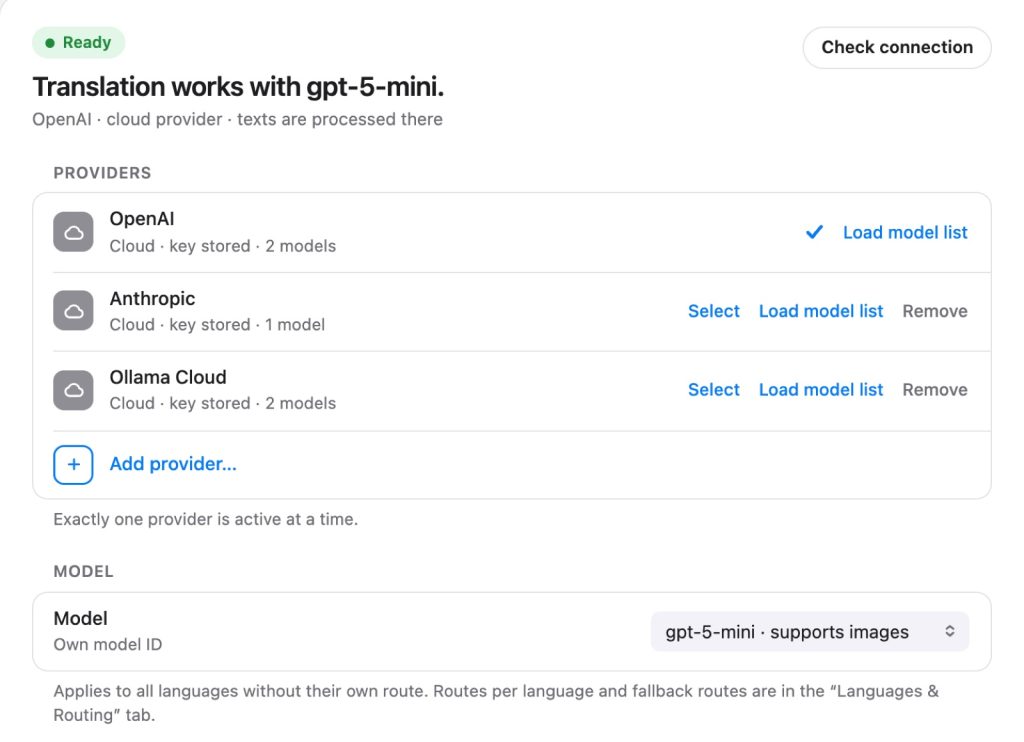
A provider's key is checked with a model query before being saved and is then stored in encrypted form. “Check connection” sends a test set to every model used. With the “Automatic” model selection, the plugin tries other models after a rejected translation, starting with proven ones first.
Quality
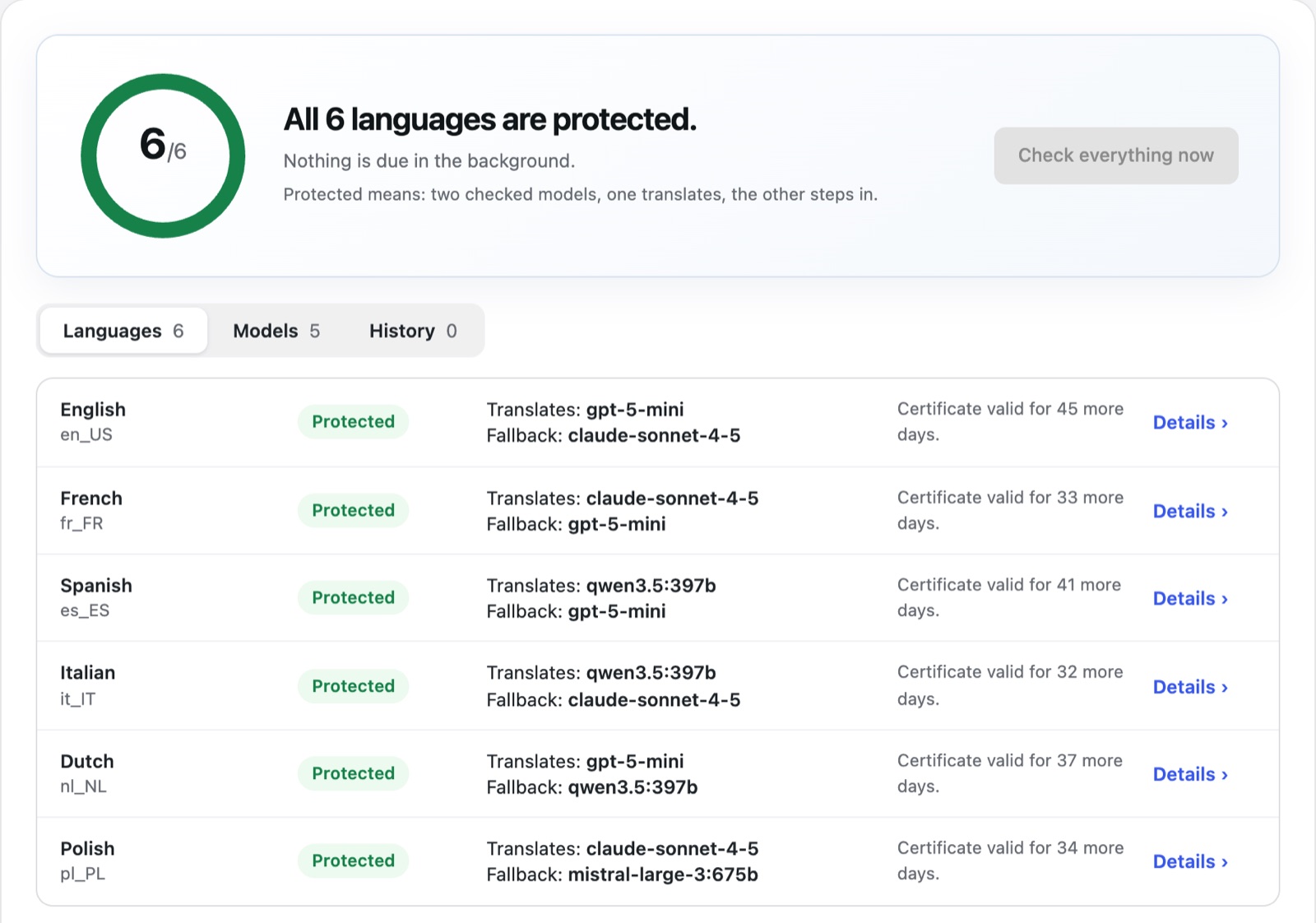
Every language with two tested models.
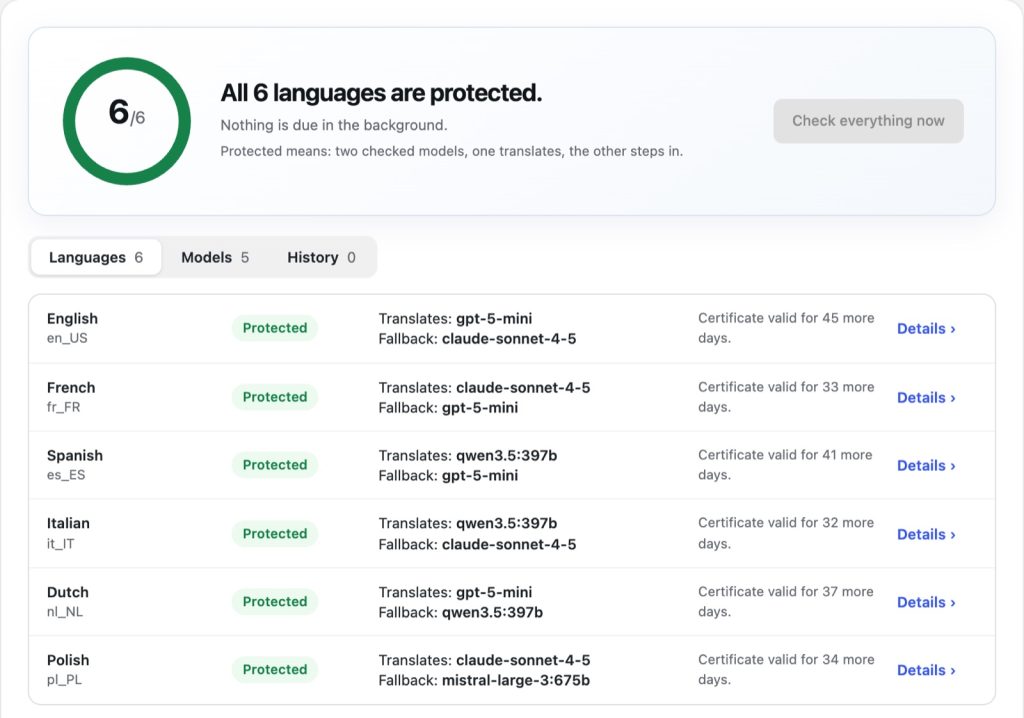
An independent checker model evaluates every sample based on meaning, completeness, naturalness, grammar, terminology, and style. A language is considered protected if two models are certified: one translates, the other steps in during a failure.
Glossary
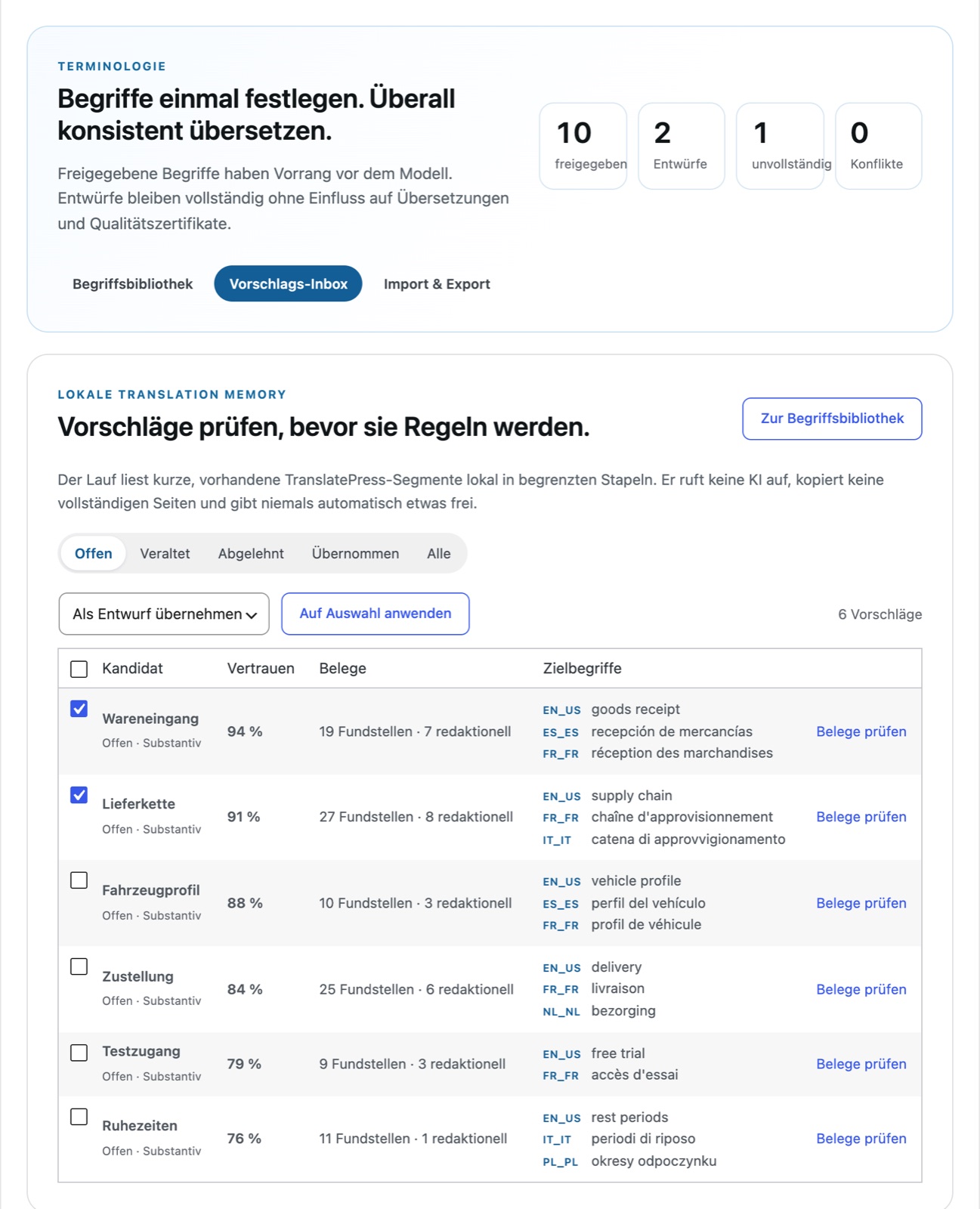
Define terms once, translate them identically everywhere.
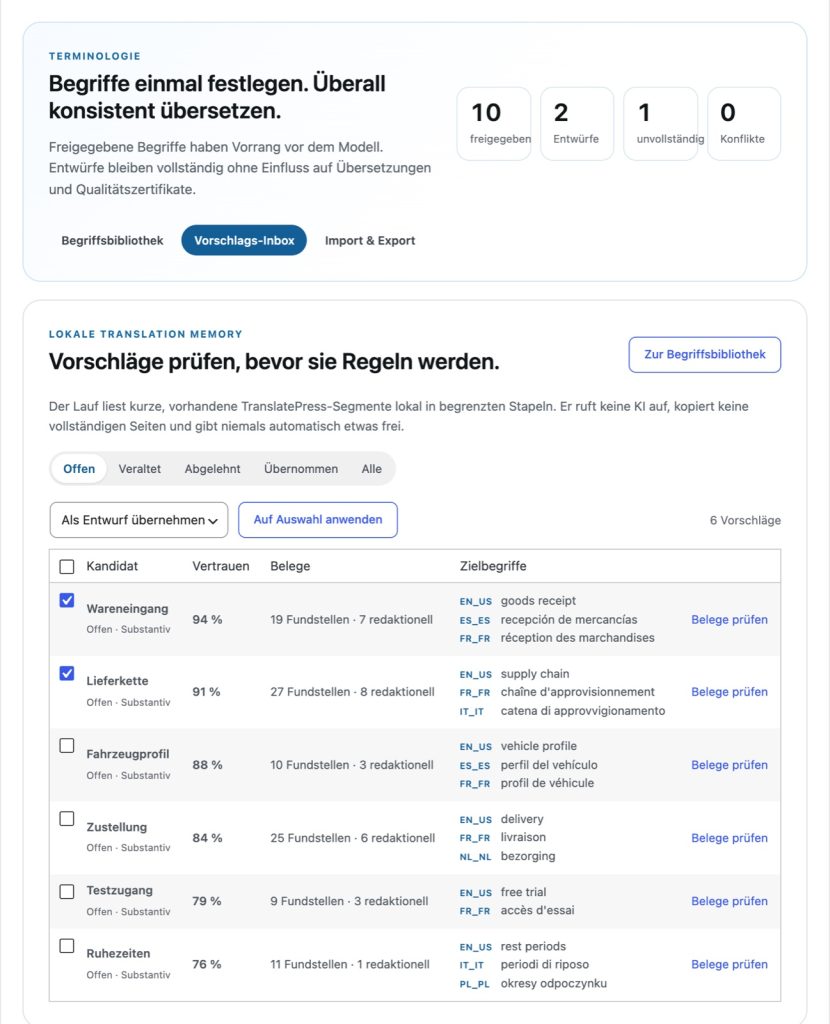
Suggestions are generated from your existing TranslatePress translations, without an AI call and without automatic approval. Glossaries can be imported and exported as CSV or TBX. Before a new translation, an impact analysis shows which texts are affected.
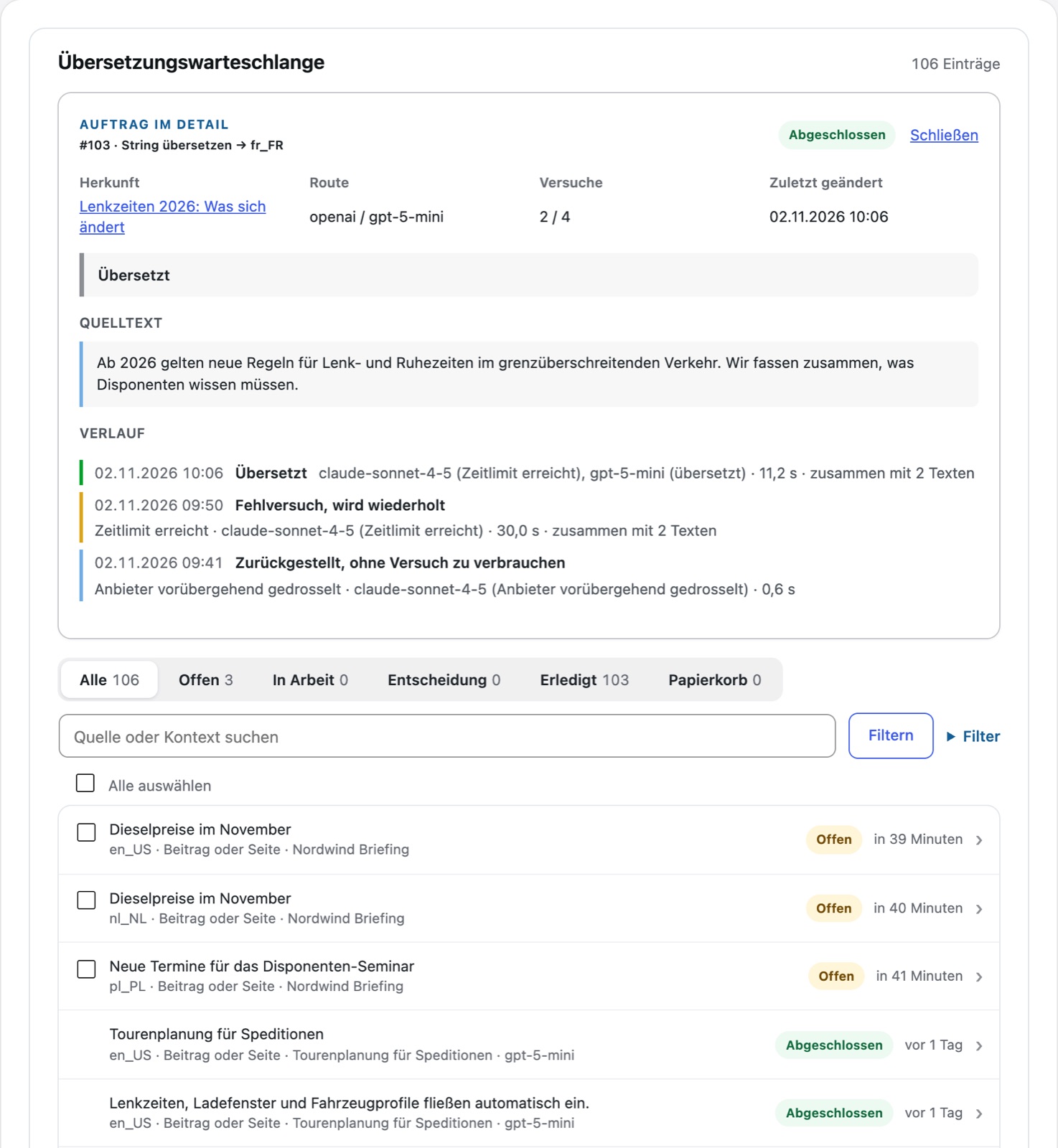
Queue
Anything that fails is listed with a reason.
New and changed posts are pre-translated in the background. For every job, you can see the history of all attempts and which model was queried with which result. You can accept a rejected suggestion or translate it yourself.
04 — Feature list
All features at a glance.
TranslatePress connection
- Own engine under “TranslatePress › Automatic Translation”
- Works with the free version of TranslatePress Multilingual
- Target languages come from TranslatePress, without a fixed language list
- Enable each target language individually
- Translates regular page texts; language files and slugs remain excluded
- Translations are only stored in the TranslatePress dictionary
- Exclusion words from TranslatePress act as exact protection rules
- Approved comments are translated, without author name, email, and IP address
- Hashtags are translated to suit the language; international and brand tags remain
AI providers and routes
- Ollama Cloud, OpenAI, Anthropic, and DeepSeek with your own API key
- Ollama on your own server, without a key
- The key is verified via model query and only then stored encrypted
- Select models from the provider's list
- “Check connection” translates a test sentence with every model used
- Each target language has its own main route and one fallback route
- Model selection “Fixed” or “Automatic” with additional models
- Automatic tries tested and proven models first
- No longer guided models are bypassed and reused upon return
Verification of every translation
- Markup, links, and placeholders must be fully preserved
- Numbers, amounts, and dates are cross-checked with the source text
- Answers in the wrong language are rejected
- Model explanations and copied job details are recognized and rejected
- Approved glossary terms are checked before saving
- Unchanged names are only considered completed when two models agree
- Optionally, a second model checks high-risk cases before saving
- Rejected answers are not saved; the reason is stated on the job
Quality certificates
- Fixed German test text, standard and formal profile
- Another model evaluates every sentence according to six criteria
- Certificate only upon a good average and without any weak criterion
- In close cases, a second, independent reviewer decides
- Certificates are valid for 60 days and expire if testing rules change
- A language is protected with two certified models
- Optional background test scheduler with a daily limit
- Unsuitable models are suspended for the affected language
Glossary and terms
- Terms with a target term per language, approved individually per language
- Rules: never translate, preferred translation, forbidden variants
- Drafts have no effect until they are approved
- Modes: off, shadow mode (recognize only), and active
- “Apply term immediately” shows all affected translations beforehand
- Previous text remains visible until the new translation has passed
- Suggestions from existing translations, without AI call
- Import and export as CSV or TBX, with preview
Queue and background processing
- New and modified entries are pre-translated in the background
- Visitor request: page loads immediately, missing texts are scheduled with priority
- Optional instant mode with a maximum wait time of eight seconds
- Identical text on multiple pages is translated once per language
- Translation Guardian checks for gaps daily
- History per job shows every requested model with result
- Accept rejected suggestion or translate yourself
- Pause for one hour, eight hours, or until resumed
- Prioritize or postpone jobs; the trash keeps items for 30 days
Costs and limits
- Daily limit for requests to the provider
- Flat-rate mode only counts toward usage and sets no limit
- Exhausted daily budget stops new requests
- URLs, shortcodes, and other technical texts are not sent to any model
- Existing equivalent translations are adopted without a model call
- Tokens and costs appear when the provider reports them
- If the provider is busy, jobs wait without consuming attempts
Protection of existing translations
- Only writes to entries that TranslatePress lists as untranslated
- Editorially maintained translations are never changed automatically
- Simultaneous changes in the TranslatePress editor take precedence
- Changing providers or models does not trigger a new translation
- The page shows the source text until a valid translation is available
- Deactivation turns off the engine in TranslatePress
Operation, data protection, and diagnostics
- API keys stored encrypted and never displayed again
- Texts from logged-in users are not sent to the provider by default
- Activity and admin bar show the status and progress of all processes
- Tests in the WordPress website status
- Operating figures for the last seven days per provider, model, and language
- Retention periods freely selectable
- Uninstallation retains data unless deletion is explicitly chosen
- Runs without any other Schall plugin; the shared AI layer is included
Interfaces
- WordPress Abilities API (from WordPress 6.9)
- Write actions require administrator rights and confirmation
- Hooks for RSS and widget plugins
- Transfers from the Content Radar via the same queue
- Shared provider interface and activity with other Schall plugins
05 — Gallery
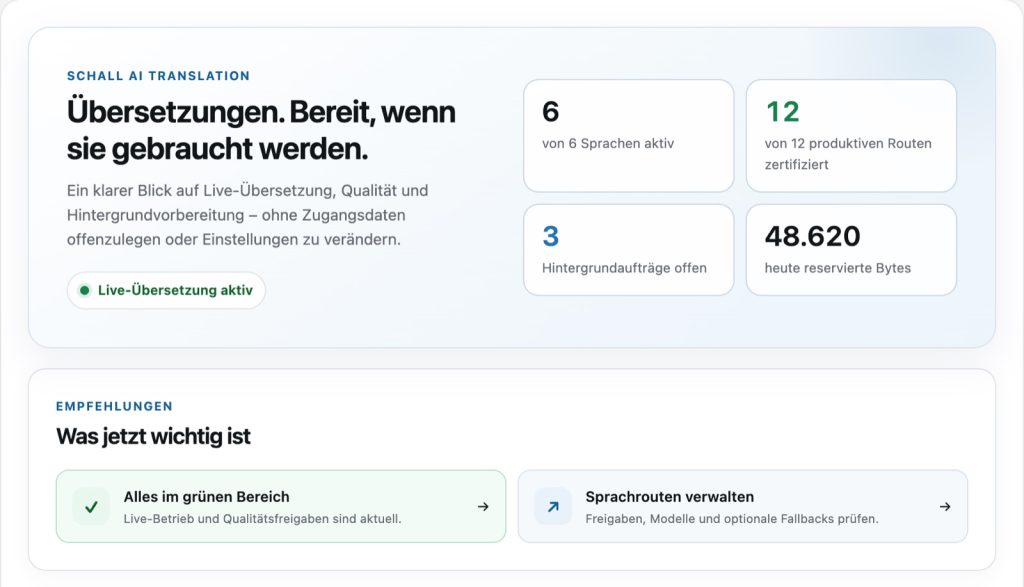
All views in detail.
Click to enlarge · Demo data from Nordwind Logistik

06 — Works with
Works with TranslatePress.
TranslatePress
The adapter appears in TranslatePress under “Automatic Translation” as its own engine. TranslatePress remains the storage for all translations; the target languages come from there.
Content Radar
Approved suggestions from the Content Radar can be handed over for translation. They run through the same queue and the same safeguarded write path.
07 — Requirements
What you need.
The selected provider bills for the costs of AI requests. A server cron is recommended.
WordPress
6.5 or newer
PHP
8.3 or newer
TranslatePress
TranslatePress Multilingual from 3.3.5, the free version is sufficient
Source language
German; quality checks and tests are designed for it
AI
Access to Ollama Cloud, OpenAI, Anthropic, or DeepSeek, or your own Ollama server
08 — Questions
Frequently Asked Questions
Do I need TranslatePress?
Yes. The adapter appears in TranslatePress under “Automatic Translation” as its own engine. TranslatePress remains the storage for all translations and the editor for corrections. The free version is sufficient.
Which AI providers can I use?
Ollama Cloud, OpenAI, Anthropic, and DeepSeek with your own key, or Ollama on your own server. Keys are stored encrypted and will not be displayed again.
Which languages does the plugin translate?
All target languages configured in TranslatePress. The plugin is designed with German as the source language. This engine does not translate addresses (slugs) and texts from the language files of themes and plugins.
Does the adapter overwrite existing translations?
No. It only translates entries that are still untranslated. Manually maintained translations remain protected, and switching providers or models does not trigger a new translation.
What costs are incurred?
Your provider calculates the costs for AI requests. In the plugin, you can set a daily limit or choose a flat rate if your plan uses flat-rate billing. Checks by the auditor model count toward the same budget.
What do visitors see while a text has not yet been translated?
The text in the source language. The page is delivered immediately; missing texts are prioritized in the queue and usually appear translated after a few minutes. Alternatively, the instant mode waits up to eight seconds for the AI.
What data is sent to the AI provider?
The source text with protected placeholders, the language direction, and the translation instruction. Texts from logged-in sessions are not sent by default; author data from comments is never sent.
Can I correct a translation myself?
Yes, as usual in the TranslatePress editor. For rejected jobs, the queue shows the last suggestion with the reason; you accept it or translate it yourself. Either way, it stays untouched afterwards.
What happens when deactivating or uninstalling?
When deactivating, the plugin switches off its engine in TranslatePress; translations and data are preserved. The TranslatePress dictionary remains untouched in any case.
Questions about Translation Adapter?
Pricing and demo coming soon. Until then, we are happy to answer your questions personally.